FFGear API
Overview
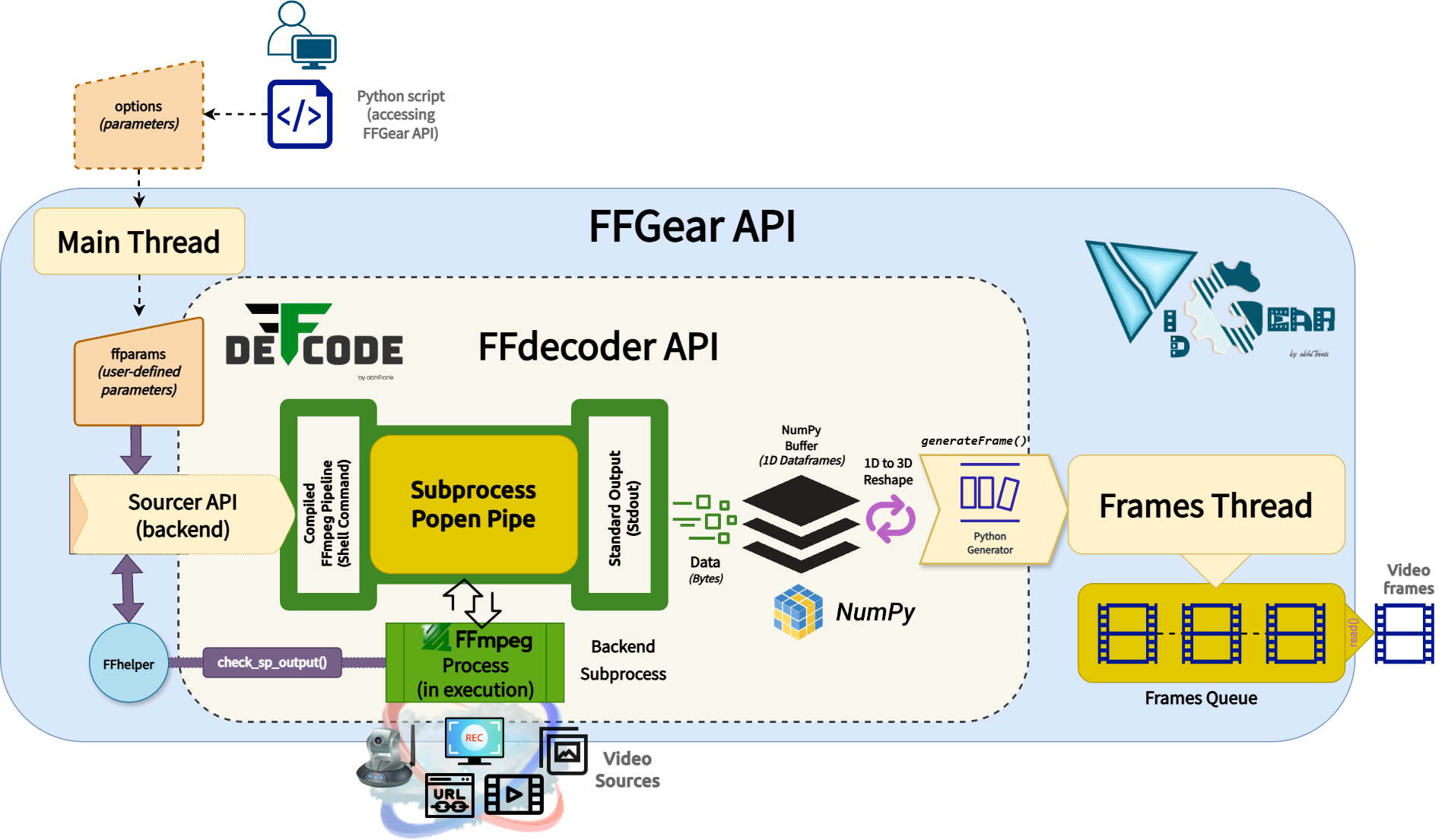
FFGear is a multi-threaded , high-performance
wrapper around DeFFcode's FFdecoder API that compiles and executes an FFmpeg pipeline inside a subprocess pipe for generating real-time, low-overhead, lightning-fast decoded video frames in Python.
FFGear API provides direct, transparent access to the full FFdecoder feature-set, including:
- Hardware-Accelerated Decoding — GPU-powered decoding with CUDA/CUVID and other hardware-accelerated backends
- Flexible Pixel Formats — support for any FFmpeg pixel format (e.g.,
bgr24,yuv420p,gray) with optional OpenCV compatibility patches for YUV/NV layouts. - Per-Frame Metadata Extraction — asynchronous frame metadata extraction through the
showinfofilter. - Live Complex Filtergraphs — support for live simple and complex FFmpeg filter pipelines.
- Multi-Input Sources — multiple simultaneous inputs routed via
-mapor-filter_complex. - Wide Source Support — capture USB, virtual, and IP camera feeds by index similar to OpenCV, along with support for multimedia files, image sequences, desktop screen capture, and network streams (HTTP(s), RTSP/RTP, etc.).
Internally, FFGear employs the Threaded Queue mode (configurable via QUEUE_SIZE, THREADED_QUEUE_MODE, THREAD_TIMEOUT) for zero-bottleneck asynchronous frame delivery, and maintains the standard OpenCV-Python coding syntax for drop-in integration.
Similar to CamGear, FFGear also supports the yt_dlp backend for seamlessly pipelining live video frames from streaming services like YouTube, Twitch, and many more ➶
FFGear requires the deffcode library
FFGear API MUST have the deffcode library installed, along with a valid FFmpeg executable. Any failure in detection will raise ImportError/RuntimeError immediately.
Install via pip:
For FFmpeg installation, see FFmpeg Installation ➶
Helpful Tips
-
Enable
logging=Trueon the first run to easily identify any runtime errors. -
FFGear follows the same
.start()→.read()→.stop()pattern as CamGear — it's a drop-in upgrade for FFmpeg-powered sources. -
Use
ytv_metadataclass variable to retrieve streaming video metadata when usingstream_mode=True.
Usage Examples
After going through FFGear Usage Examples, Checkout more of its advanced configurations here ➶
Parameters
References